edge-ddns-proxy
Automatically update modern DNS provider records using your router/ONT DDNS client
| English | 简体中文 |
📋 Overview
edge-ddns-proxy is a serverless middleware proxy that runs on edge computing platforms (Alibaba Cloud, Tencent Cloud, Cloudflare). It bridges traditional DDNS protocols used by routers/ONTs with modern DNS provider APIs, so legacy devices can update DNS records on modern DNS platforms without running any extra client software.
🔄 How It Works
       ┌─────────────────────┐
       │     Router / ONT    │
       │  Built-in DDNS      │
       └─────────────────────┘
                 │
        Traditional DDNS protocol
     (DynDNS/no-ip/EasyDNS/qdns, etc.)
                 │
                 ▼
       ┌─────────────────────┐
       │  edge-ddns-proxy    │
       │   (Edge Function)   │
       │ Protocol Translation │
       └─────────────────────┘
                 │
        Modern DNS provider API
                 │
                 ▼
       ┌─────────────────────┐
       │     DNS Providers   │
       │   - Cloudflare      │
       │   - Alibaba Cloud   │
       │   - Tencent Cloud   │
       └─────────────────────┘
🎯 Use Cases
This solution fits when:
- ✅ Your router/ONT only supports traditional DDNS protocols (DynDNS, no-ip, etc.)
- ✅ Your domain is managed by modern DNS providers (Cloudflare, Alibaba Cloud DNS, Tencent Cloud DNS, etc.)
If you want to run a client-side DDNS updater to update your IPv6 address, or you need more customization, see https://github.com/NewFuture/DDNS
📡 Supported DDNS Protocols
- DynDNS - Classic dynamic DNS protocol
- oray (花生壳) - A popular DDNS provider in China
- no-ip - No-IP DDNS protocol
- EasyDNS - EasyDNS update protocol
- qdns - QDNS protocol and similar services
☁️ Supported DNS Providers
- Cloudflare
- Alibaba Cloud DNS (AccessKey)
- Tencent Cloud DNS (DNSPod AccessKey)
- PRs welcome
🚀 Quick Start
Prerequisites
- A router or ONT device with traditional DDNS functionality
- API access permissions for your DNS provider (Alibaba Cloud / Tencent Cloud / Cloudflare)
Basic Configuration
- Configure your DNS provider API credentials (AccessKey, SecretKey, etc.)
- Record the proxy service access URL
📝 Configuration Example
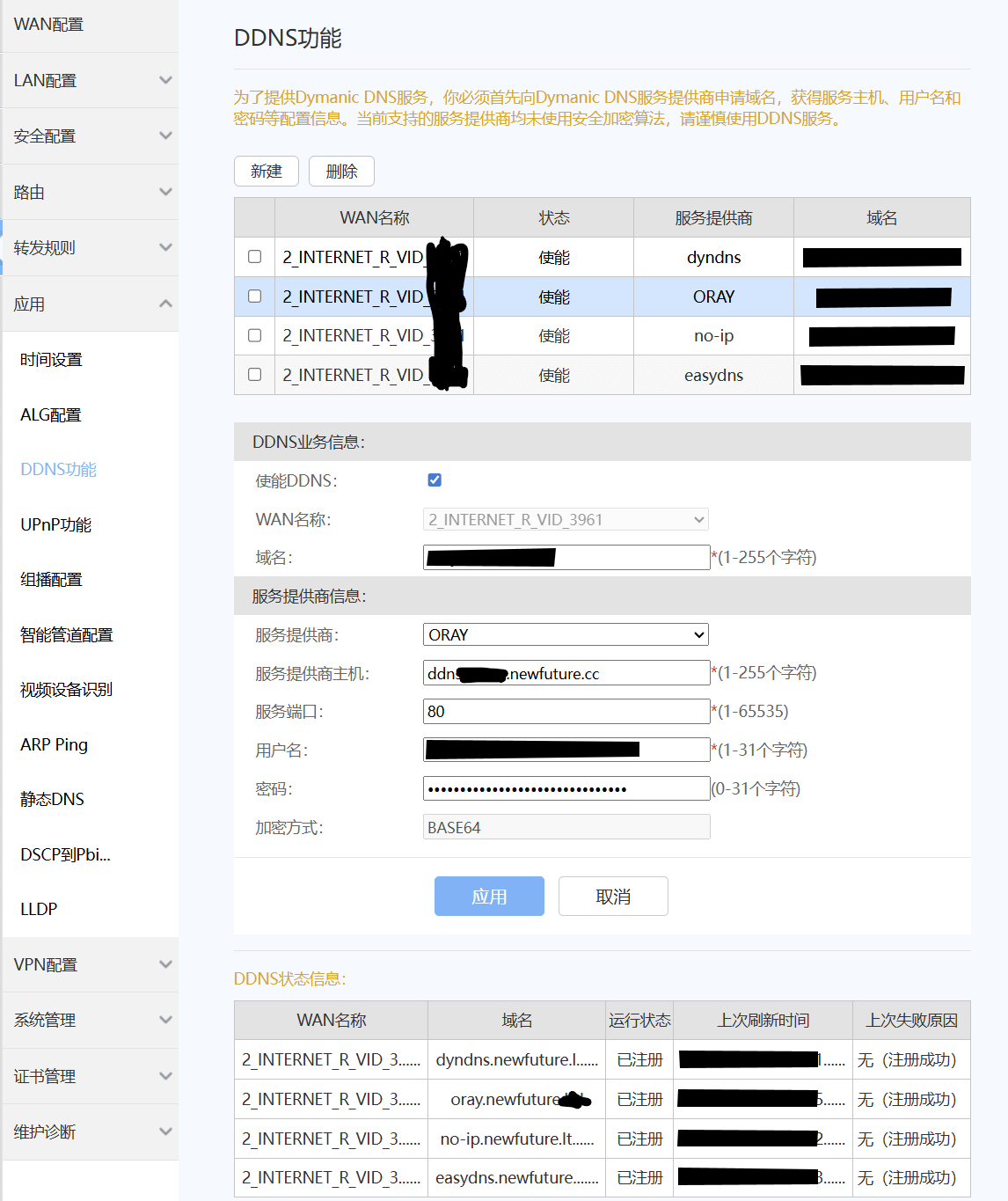
Router DDNS Settings:
Hostname: yourdomain.com
Service Provider: DynDNS family, or no-ip / EasyDNS / Oray
DDNS Server: edge-ddns-proxy.edge-platform.com
Username: your-key
Password: your-api-token
🔒 Security Notes
⚠️ Important Notes:
- Traditional router DDNS protocols commonly use plain HTTP (not HTTPS). There is a theoretical interception risk on the router/ONT → edge-node link
- Follow the principle of least privilege when configuring API keys, granting only DNS record update permissions
- Add access control for the proxy service to prevent unauthorized access
- To restrict which domains can be updated, set environment variable
ALLOWED_SUFFIXwith comma-separated domain suffixes (e.g..example.com,.newfuture.cc); other domains will be rejected - Regularly review and rotate API credentials
📚 Technical Details
Data Flow Process:
- 📡 Router detects a public IP change and sends a standard DDNS update request (HTTP GET/POST)
- 🔄 edge-ddns-proxy receives and parses the traditional DDNS request
- 🔍 The proxy extracts key information: IP address, hostname, authentication
- ✅ It validates the request and determines the target domain
- 🌐 It calls the corresponding DNS provider API to update the record
- ✔️ It converts the result into a standard DDNS response and returns it to the router
Supported Edge Computing Platforms:
🚢 Deployment Guide
Alibaba Cloud ESA Function Deployment
Method 1: Manual Code Paste Deployment
- Log in to Alibaba Cloud ESA Console
- Visit Alibaba Cloud ESA Console
- Navigate to Edge Functions > Function Management
- Create New Function
- Click Create Function
- Select Create from Scratch
- Function Name:
edge-ddns-proxy(or custom name)
- Configure Function Code
- In the code editor, delete the default code
- Copy the contents of
index.jsfrom this repository - Paste into the code editor
- Configure Environment Variables (Optional)
- Click the Environment Variables tab
- Add environment variables:
ALLOWED_SUFFIX: Allowed domain suffixes (comma-separated), e.g.,.example.com,.newfuture.ccDDNS_KV: KV namespace binding (for caching, optional)
- Save and Publish
- Click Save
- Click Publish to deploy the function to production
- Configure Routes
- In Route Management, add routing rules
- Match condition: e.g.,
/*or specific path - Bind to the newly created function
- Get Access URL
- View the assigned edge function domain in function details
- Or bind a custom domain
Method 2: GitHub Repository Auto-Deployment
- Prepare GitHub Repository
- Fork this repository: https://github.com/NewFuture/edge-ddns-proxy
- Or use your own repository
- Log in to Alibaba Cloud ESA Console
- Visit Alibaba Cloud ESA Console
- Navigate to Edge Functions > Function Management
- Create New Function and Link GitHub
- Click Create Function
- Select Import from GitHub
- First-time users need to click Link GitHub Account and authorize
- Select Repository and Branch
- After successful authorization, select your repository
- Select deployment branch (usually
mainormaster)
- Configure Build Settings
- Entry file:
./index.js(or defined inesa.jsonc) - Root directory: Keep default
/ - Build command: Leave empty (this project requires no build)
- Environment Variables:
ALLOWED_SUFFIX: Allowed domain suffixes (optional)
- Entry file:
- Save and Deploy
- Click Save and Deploy
- ESA will automatically pull code from GitHub and deploy
- Auto-Sync
- Each push to the specified branch triggers automatic redeployment
- View deployment status in deployment history
- Configure Routes and Domains
- Configure routing rules in Route Management
- Bind custom domain (optional)
Post-Deployment Configuration
After deployment, you’ll receive an edge function access URL, for example:
https://your-function.esa-cn-shenzhen.fcapp.run
Use this address in your router’s DDNS settings:
DDNS Server: your-function.esa-cn-shenzhen.fcapp.run
Username: <Your DNS Provider AccessKey>
Password: <Your DNS Provider SecretKey>
Hostname: yourdomain.com
📄 License
This project is open-sourced under the Apache License.
🤝 Contributing
Issues and pull requests are welcome!
📮 Support
If you have questions or need help, please submit an issue.